Review and approve ideas
When an idea needs sign-off before it becomes content, send it for approval from the Ideas Board. Each reviewer records their own decision, and the idea is approved only when all of them agree.
Requesting approval
Only ideas in Backlog can be sent for review.
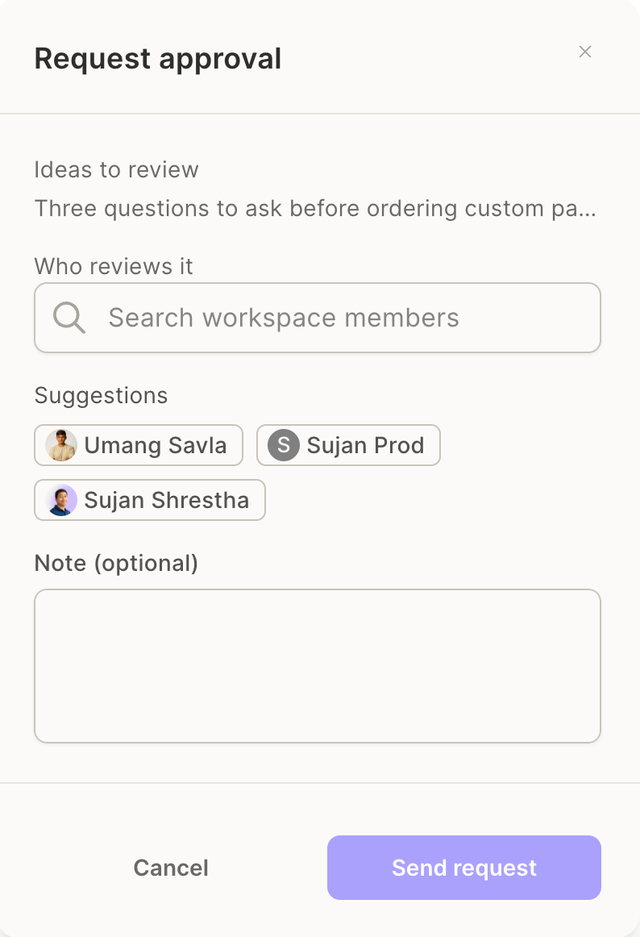
- Select one or more ideas and click Request approval, or open a single idea and click Share.
- Under Who reviews it, pick one or more workspace members. Add a Note if you want to give them context.
- Send request. Each idea gets its own review with the same reviewers. A confirmation tells you how many ideas were sent.
Reviewers get an in-app notification and an email, depending on their notification settings, with a link that opens the idea on the board.
What reviewers see
Ideas waiting for a decision move to the top of the board:
- Waiting your approval lists the ideas where your decision is pending. The row shows Approve and Request changes instead of the vote buttons.
- Waiting for approval lists the ideas you or others sent, not yet fully approved.
Opening the idea shows who requested the review, the note, the reviewers and each reviewer's current decision.
Approving or requesting changes
- Approve records your decision. The idea becomes Approved once every reviewer has approved. The requester is notified at that point, not after each approval.
- Request changes asks for a written reason. The reason is posted as a comment on the idea, the review ends, the idea goes back to Backlog and the requester is notified.
While a review is pending, the idea is locked: nobody can edit, move, archive or re-send it.
After the review
- The requester can Cancel review at any time while it is pending. The idea returns to Backlog unchanged.
- After a change request, fix the idea and click Request review again, with the same or other reviewers. Links from the earlier review no longer accept decisions.
- The latest outcome and its reviewers stay visible in the idea's details.
If the person who requested the review has left the workspace, an Admin can cancel it.
What approval does not do
Approving an idea does not create, schedule or publish anything. The next step is Create from this on the idea. See Create content from an idea.
Related articles
- Ideas Board
- Collaboration: how approvals work on campaigns and posts
- Notifications: where review notifications are configured