The Analyst
The Analyst is the AI agent of Analytics. Ask it a question in your own words, and it answers from the same reports as the page: your channels, Google Analytics, Search Console, AI search and your ad accounts.
Opening it
The Analyst opens beside Analytics, in the agent panel (Agent in the nav rail). It also opens from:
- Any card on the page: click it to ask about that card. The card shows as a chip in the question box.
- The detail of a campaign, a post or the Moment comparison: Ask the Analyst about this.
- What am I missing? on the Search tab, when Google data is missing.
What to ask
Each tab suggests questions to start with, for example "How did we do this period?", "Which content performed best?", "Compare with the period before", or, on Paid, "Which campaigns brought in results?". Each card also has its own suggestions.
The Analyst can look at:
- your results by channel, and each post, video and email
- the image of a post (or a frame of a video) when the question is about what it looks like
- your Google Analytics conversions
- your Google searches, by query, page, country and device, and your positions
- what ChatGPT, Claude and Gemini say about you, and who they name instead
- your ad campaigns, ad groups and ads
By default it answers for the period and the filter selected on the page. Name another period or channel in your question and it uses that instead.
Reading an answer
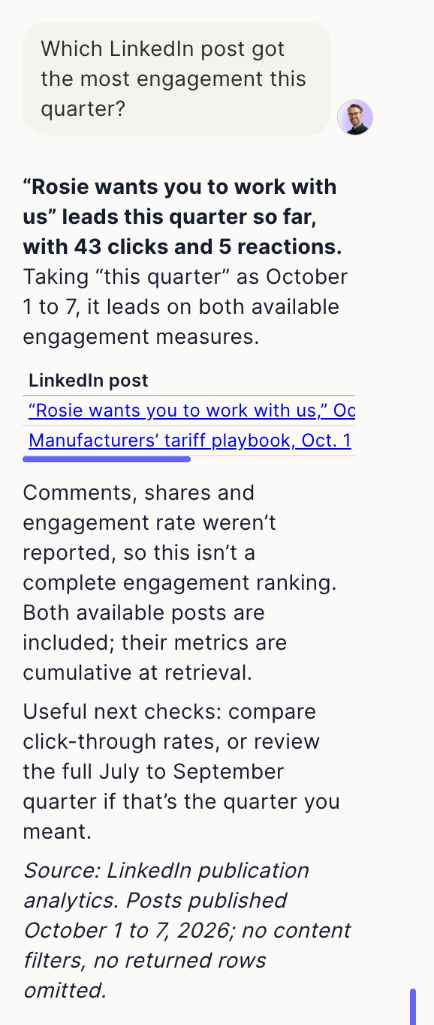
A precise question gets the figure in a sentence; a broad one gets the conclusion first and up to three findings. The book icon (Sources) shows which reports, dates and limits the answer relies on. When data is missing, the Analyst says what's missing and what would make it available, and can show the button to connect the account.
When you ask for a content plan, the answer can end with Brief the Planner, which opens the Planner with your goal and the findings.
Sessions
Past conversations are listed under the Analyst's name at the top of the panel. After a day without activity, the panel suggests starting a new session.
Limits
- It reads your data; it doesn't change your campaigns, ads or settings.
- It only knows what your connected accounts report. A recent post may not have results yet.
- Questions are limited to 5,000 characters.